

Not all robots are created equal. While there are plenty of cool toy robots in the market for students to play with, educational robots designed for STEM projects offer opportunities for you to introduce students to computer science and get them interested in future careers.
And they’re never too young to get started. Starting as early as PreK, students can engage in computational thinking, creativity, engineering, design thinking, and creative problem solving using programmable robots.
There’s no question that the world of robotics and coding can seem daunting from the start. Luckily, we’ve done the research for you to help you understand which type of robots will maximize student learning. Below we’ve highlighted eight classroom-friendly robots and ideas for incorporating them into your curriculum.
Coding Critters
Skill level: Beginner
Grade range: PreK–3
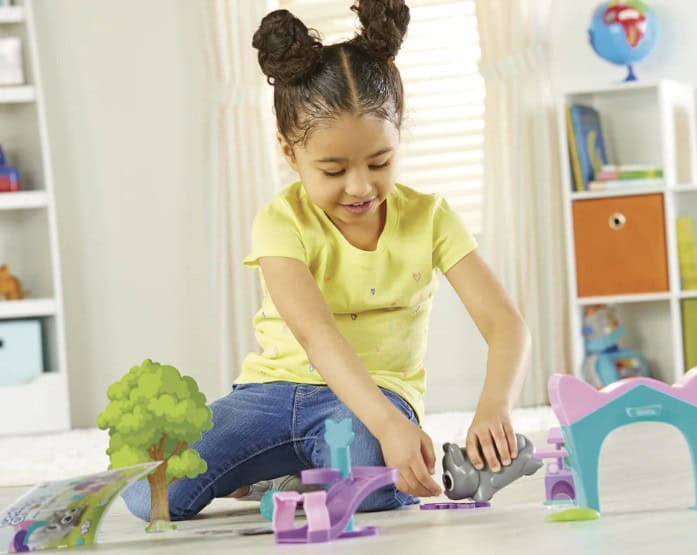
Get your students to start coding at a young age with Coding Critters. Cute and colorful critters named Scamper, Sneaker, Ranger, Zip, Rumble, and Bumble will introduce preschoolers and elementary school students to critical-thinking, problem-solving, and other STEM skills with the help of fun, interactive, and screen-free coding challenges.
Activity ideas
- As a warm-up, get your students thinking like a coder through sequencing. Arrange a simple obstacle course and have each student pair up with a classmate. Assign one student to be the coder and the other to play the role of a robot. Have the coder use simple verbal commands such as forward, back, turn left, and turn right so the robot can get through the course to see if the sequence is correct.
- Practice ABCs and vocabulary while building valuable sequencing and logic skills. Students can place a Coding Critter on the ground and then place three random objects near it in different directions. The students then can build a code sequence to get their Critter to one of the objects based on the first letter of its name.
- Practice counting numbers while building valuable sequencing and logic skills. Students can place a Coding Critter on the ground and then place small items like coins, beads, marbles, and pieces of candy around the Critter in groups up to 10. Call out a number and have students build a code sequence to get their Critter to the group of items that matches the number.
- Play a racing game in between lessons. Students can set a start and finish line about five feet apart and place a Coding Critter on the ground and roll one dice cube to get a number. Students can then program the number, press go, and see their Critter race. They will have to rush to repeat the steps to get their Critter to the finish line first.
Code & Go™ Robot Mouse
Skill level: Beginner
Grade range: PreK–5
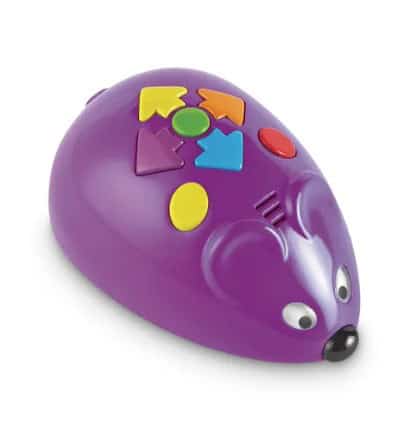
Teach students hands-on coding concepts with Jack, the Code & Go Robot Mouse. Jack will help students create a step-by-step path using 30 double-sided coding cards that provide the perfect introduction to coding concepts. Jack lights up, makes sounds, and features two speeds and colorful buttons to match coding cards for easy programming and sequencing practice.
The extensive activity set can be a great tool for teaching the basics of coding like logic, sequencing, and problem-solving through fun activities that will have Jack navigating through mazes and obstacle courses that you and your students can create.
Activity idea
Set up a maze for your students with blocks or other toys on a tabletop or on the floor. Students can then program Jack so he can make it from one end of the maze to the other. Creating tunnels or other obstacles with books and classroom supplies is another option for Jack to navigate through or around. Rearrange the maze and obstacle course with different paths and routes to challenge students.
Cubelets®
Skill level: Beginner to intermediate
Grade range: PreK–12

Cubelets is a versatile robot construction system that uses magnetic connections to make it easy for any skill level. The robot blocks can be combined and rearranged by students in different ways to create an entirely new robot.
Students can also connect the three different kinds of Cubelets® (Sense, Action, and Think) together to build a unique robot with its own program to sense its surroundings, to act on its surroundings, and to take in data.
Ozobot
Skill level: Beginner to intermediate
Grade range: K–12
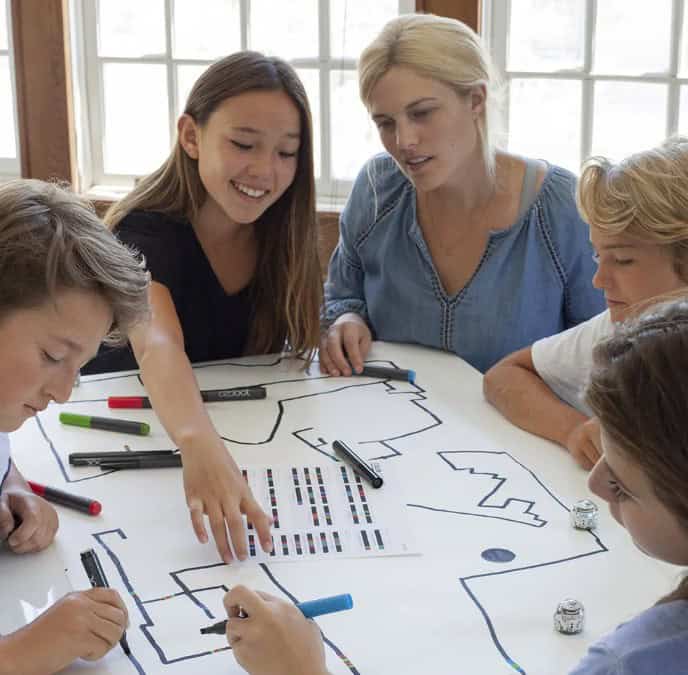
Ozobot is a pocket-sized programmable robot that can “see” colors, follow lines and mazes, and detect intersections on paper and screens. Its scalable platform supports simple to complete coding. This desk-friendly robot is packed with learning possibilities as students are introduced to coding concepts like cause/effect, critical thinking, and debugging.
Students can learn how to code using Ozobot in two different ways: screen-free with Color Codes and online with OzoBlockly visual programming software. Students can use Color Codes to learn basic coding concepts with the use of markers or stickers and OzoBlockly to build programs with drag-and-drop blocks.
Activity ideas
From STEAM-related activities to lessons in language arts and history, students can learn the basic functionality of Ozobot through line following, drawing color codes, and programming directionality.
Encourage students to show off their creativity by crafting costumes for their Ozobots that match up with lesson and activity themes, special occasions, and holidays throughout the year. A dressed up Ozobot will add an extra layer of fun and engagement to every lesson and activity that students participate in.
Makeblock
Skill level: Intermediate
Grade range: 3-12

Prepare students for the digital age with mBots from Makeblock. Students can build mBots for simple playing, game-based learning, and advanced programming. Through hands-on learning and coding for the mBot, students will be able to think logically, be more observant, and solve problems independently.
The mBot has beginner-friendly coding designs for young and older students alike. Students can use block-based coding that enables them to simply drag and drop color blocks for simplified programming.
Students then can use preset control modes or write new code through the mBlock app: obstacle-avoidance mode, line-follow mode, and manual-control mode. It connects to smartphones, tablets, and computers via Bluetooth® function blocks for control. The app can also be used for interactive and fun games.
Activity ideas
Prepare for a dance party. Add-ons will give students an opportunity to assemble their mBots into different forms so they can see more of what they’re capable of, learn additional concepts, and put coding into practice.
With the Music Box add-on, students can use programming and additional parts to turn their mBot into a dancing machine. When set up, switch on the mBot by controlling lights and watch it as it spins to music and its LED light shines bright.
STEM careers await
As students’ skills develop, they’ll become more fluent with technology, and it’ll be easier for them to make an impact in a STEM career. Continuing to add coding skills to their toolbox will open up doors to a wide range of high-paying, in-demand jobs, from web designers and computer programmers to software developers and computer systems administrators. Their future can be built and programmed, starting with you and the robots you bring into the classroom.
Leave a Reply